
Work
Mind Map for Meetings
Capture the whole meeting on one page with a free meeting mind map — agenda, decisions, and action items visible together.
Quick answer: A meeting mind map puts the meeting name in the center, then branches into topics, decisions, actions, and follow-ups. Mind Map Online is free, needs no login, and exports your notes as PDF, PNG, SVG, or JSON for sharing after the meeting.
One screen, whole meeting
Topics, decisions, and actions never get lost in a document. If someone asks "what did we agree?", the map answers in one glance.
Agenda becomes minutes
Plan the agenda as branches before the call, then type decisions and actions directly under each item as the meeting runs.
Share without accounts
Export as PNG for Slack, PDF for email, or SVG for a design tool. No signup for you or the people you share with.
Recommended structure
- ✓ Topics — one branch per agenda item, in order.
- ✓ Decisions — what was agreed, under the topic it belongs to.
- ✓ Actions — owner + due date in each label, so follow-ups survive the meeting.
- ✓ Follow-ups — items to revisit at the next meeting.
Start from the Meeting Notes template . Compare with your current tool in our mind map vs Canva guide .
Example map: Weekly team sync
Use a live map instead of a bulleted agenda. Central idea "Weekly sync" with branches Updates, Blockers, Next steps, and Action items. Add each person's update as a sub-branch during the meeting, mark blockers in a red theme, and export the finished map as PNG to share with the team — no notes app required.
How to run a meeting on a mind map
- 1
Agenda as branches
Before the meeting, add one branch per agenda item — the map is the agenda.
- 2
Capture live
During the meeting, add sub-branches for decisions, numbers and owners as they come up.
- 3
Send the map, not the minutes
Export to PDF and share it. Everyone sees the same structure, and nothing is buried in paragraphs.
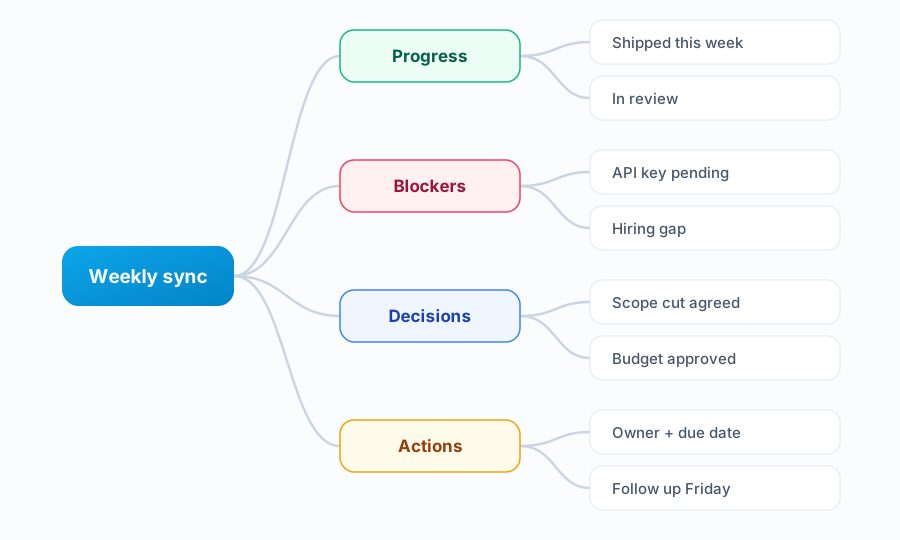
Three ways to keep a meeting on track
- Write the owner next to every action — an action without a name is a wish.
- Park tangents on a “parking lot” branch instead of following them.
- Keep decisions visually distinct from discussion so they are easy to find later.
Worked example: a weekly team sync
“Weekly sync” sits in the centre, with branches for Progress, Blockers, Decisions and Actions. Under Actions every item carries a name and a date. Reading the map back at the end of the meeting takes a minute and catches anything that was said but not recorded.
FAQ
How do I take meeting notes with a mind map?
Put the meeting name in the center and branch as topics come up: agenda items, decisions, actions, and follow-ups. Assign each action a person and due date in the node label — the map becomes your minutes.
Is a mind map good for meeting notes?
Yes, for discussion-heavy meetings. Linear notes bury action items inside paragraphs, while a map keeps topics, decisions, and actions visually separate. After the meeting you can scan action items in seconds.
Can I plan a meeting agenda as a mind map?
Yes — the same structure works in reverse. Build the agenda as branches before the meeting, share it, then fill in decisions and actions under each item while the meeting runs.
Is a mind map faster than typing meeting minutes?
Usually. You capture in structure instead of sentences, so there is no rewriting afterwards — the map is already the summary. Export it and send.
Can I use a mind map for a remote meeting?
Yes for your own notes. For shared, live editing you would need a collaborative board; a mind map works best as the note-taker’s structure, shared as a PDF or image afterwards.
What do I do with the map after the meeting?
Export it, send it to attendees, and keep the branches for Actions as your follow-up list. Re-open the same map next week to check what closed.